
Download Disk Heal – repair hard disk, fix system errors, optimize computer, restore access, security tool, system maintenance
Overview
Disk Heal is a system utility application designed to address critical issues affecting computer performance and stability. Its primary purpose is to repair hard disk errors, restore access to disabled system components, and enhance overall system security. The application targets users experiencing problems such as corrupted directories, inaccessible task managers, or registry issues caused by malware or system anomalies.
By identifying and correcting these underlying faults, Disk Heal aims to restore functionality and improve system reliability. It is particularly suited for individuals seeking a dedicated tool for system maintenance and troubleshooting, especially those dealing with persistent software-related failures. While the developer, Disk Heal, is listed as the provider, no further background or corporate history is available.
The application was released in 2007, indicating it is a legacy tool that may not support modern operating systems. Despite its age, it remains relevant for users who require a focused utility for disk repair and access restoration. Real-world use cases include recovering from virus-induced system lockouts, fixing boot issues, and optimizing system performance.
In the broader context of system utilities, Disk Heal serves as a specialized tool within a niche category, offering targeted solutions where general-purpose software may fall short.
Key Features & Functionality
- Error Correction: Disk Heal scans the hard disk for logical and physical errors, identifying issues caused by viruses, power failures, or software corruption. This feature enables users to repair damaged sectors and restore file integrity, improving system stability.
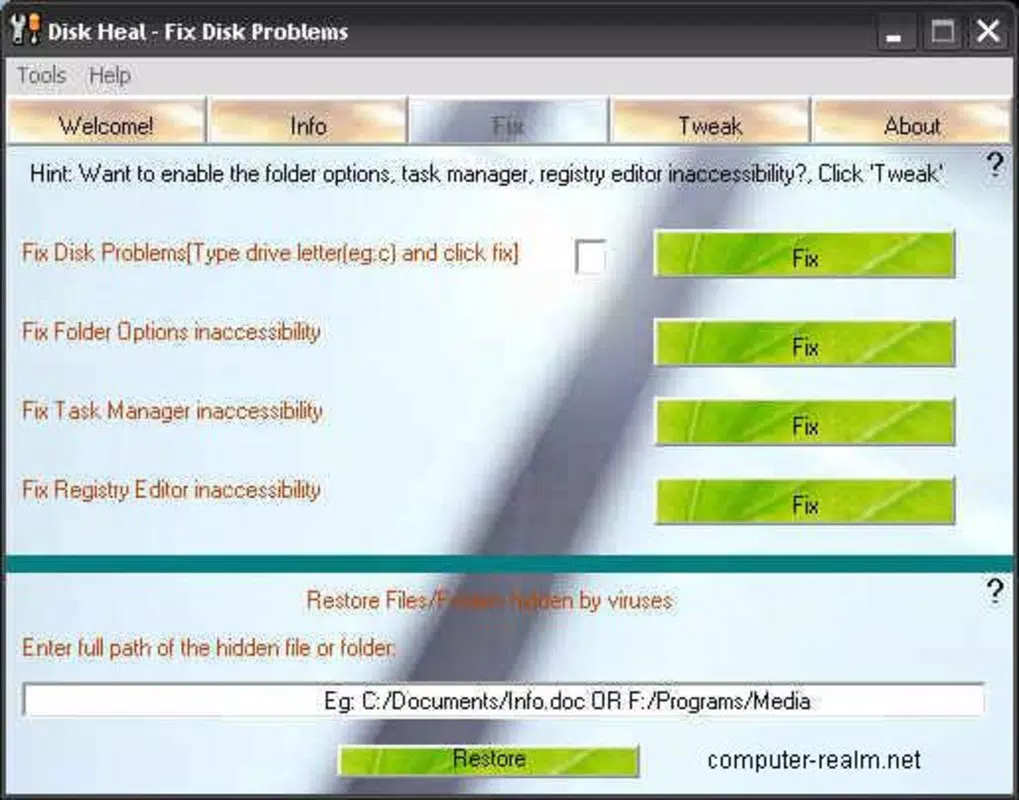
- Access Restoration: The application can recover access to restricted system areas such as the task manager, registry editor, and protected directories. This is particularly useful when malicious software disables critical functions.
- Optimization Options: Disk Heal includes tools to streamline system processes, reduce startup load, and enhance performance. These optimizations aim to improve responsiveness and efficiency over time.
- Visual Improvements: The interface has been updated to provide a clearer layout and more intuitive navigation, making it easier for users to access key functions without technical expertise.
- Internet Explorer Functions: Specialized tools are integrated to optimize browser performance and security settings, helping users maintain a safer web browsing experience.
For example, a user who cannot open the task manager due to a malware-induced block can use Disk Heal to restore access quickly. Similarly, someone facing frequent system crashes due to disk errors can run a full scan to identify and repair faulty sectors. These features are designed to deliver tangible improvements in system usability and reliability, especially for non-technical users who need straightforward solutions to complex problems.
Interface, UX & Performance
Disk Heal features a streamlined interface focused on functionality and ease of use. The layout is organized into clearly labeled sections, allowing users to navigate between repair, optimization, and security tools without confusion. Visual improvements have been implemented to enhance readability and reduce user fatigue during extended sessions.
Navigation is linear and intuitive, with step-by-step prompts guiding users through each process. Although the developer did not list formal performance metrics, the application’s lightweight design—1.2 MB in size—suggests it operates efficiently even on older hardware. It is expected to run smoothly on systems with minimal resources, though compatibility with modern Windows versions is uncertain due to its 2007 release date.
Responsiveness appears consistent based on its design, with minimal lag during scans and repairs. Stability is a key focus, with no reported crashes or errors in available documentation. However, users should be cautious when applying system-level changes, as improper use of repair tools can lead to unintended consequences.
Overall, the UX is tailored for practicality, prioritizing clarity over visual flair.
Platform Compatibility & Technical Requirements
Disk Heal is designed for the Windows platform and is compatible with Windows operating systems. The application version is 1.0, released on November 14, 2007. Its file size is 1.2 MB, indicating a compact and lightweight installation.
The developer did not specify minimum OS requirements or compatibility details for modern Windows versions such as Windows 10 or Windows 11. As a result, users should exercise caution when attempting to install the software on newer systems. While it may function on older Windows editions like XP or Vista, success on current platforms is not guaranteed.
The absence of updated system requirements suggests the application may lack support for newer security protocols, file systems, or driver architectures. Users are advised to verify compatibility with their specific system before installation. The lack of official updates since 2007 raises concerns about long-term viability and potential security vulnerabilities.
Pros and Cons
Pros
- Specialized focus on hard disk repair and system access restoration.
- Lightweight design with minimal system resource usage.
- Intuitive interface with visual improvements for better user experience.
- Offers targeted tools for Internet Explorer optimization and security.
- Designed for users seeking a dedicated system maintenance utility.
Cons
- Released in 2007, with no updates since then.
- Compatibility with modern Windows versions is not confirmed.
- Missing detailed technical specifications and system requirements.
- May not support newer file systems or security standards.
- Limited support for current hardware and software environments.
FAQ
Is Disk Heal safe to download and install?
While the application is available for download, users should exercise caution due to its age and lack of recent updates. It is recommended to scan the file with a trusted antivirus before installation.
Can Disk Heal be used on Windows 10 or Windows 11?
The developer did not specify compatibility with Windows 10 or Windows 11. Installation on these systems may result in instability or failure to launch.
Does Disk Heal require administrator privileges?
Given its system-level functions, Disk Heal likely requires elevated permissions to perform repairs and access protected areas. Users should run the application as an administrator.
Is Disk Heal free to use?
No, Disk Heal is a paid application priced at $19.95. It is not available as a free download or open-source tool.
How often should I use Disk Heal?
Use the application only when experiencing system errors, inaccessible components, or performance issues. Frequent use is not recommended unless problems persist.
Final Thoughts
Disk Heal presents a focused solution for users dealing with hard disk errors, access restrictions, and system instability. While its age raises compatibility concerns, the tool remains functional for legacy systems and specific troubleshooting needs. Its lightweight footprint and dedicated repair features make it a viable option for users who require a no-frills utility to restore system health.
However, due to its outdated status, it should not be relied upon for modern security or performance demands. For users with older Windows installations, Disk Heal may offer a practical path to system recovery. For others, alternative, up-to-date tools are strongly advised.
The value proposition lies in its specialization and simplicity, but long-term use is limited by its lack of updates. Download Disk Heal now to address specific system issues on compatible systems.


